Add Business Terms
In erwin Mart Portal, you can create business terms and group them based on your organization's projects, departments, or functions.
To add business terms, follow these steps:
-
Go to Application Menu > Enterprise Glossary.
The Enterprise Glossary page appears.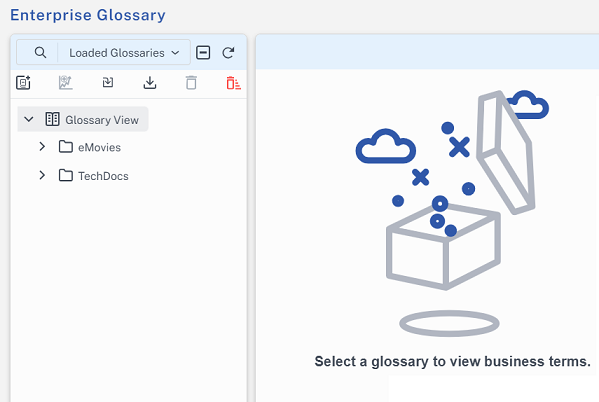
- Select a glossary.
-
Click
 .
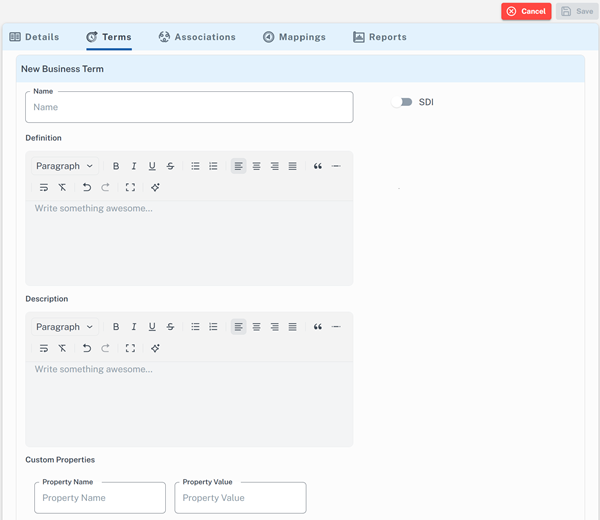
.The Add New Business Term section appears.
-
Enter appropriate values in the fields. Refer to the following table for field descriptions.
Field
Description
Name
Specifies the name of the business term.
For example, Account.
Definition Specifies the definition of the business term.
For example, An Account contains data for a customer.
To generate or edit the definition using erwin AI, click
 .
. You can also use the other formatting options for text.
Description
Specifies the description about the business term.
For example, Account contains data for posting, payments, debt recovery, and taxes.
To generate or edit the description using erwin AI, click
. You can also use the other formatting options for text.
Sensitive Data Indicator (SDI) Specifies whether the business term is sensitive. SDI Classification Specifies the sensitivity classification of the business term.
This option is available only when the SDI option is switched on.
SDI classification can be set to one Master, Public, or PII based on the data sensitivity.
SDI Description Specifies the description about the sensitivity classification.
This option is available only when SDI is selected.
Custom Properties
Specifies the custom properties of the business term. Two new fields are available for this:
-
Property Name: Specifies the user-defined property name.
-
Property Value: Specifies the value associated with the property name. This value provides additional details or context for the business term.
For example, the property name can be Payment Type, and the property value can be UPI or Credit Card. You can add multiple properties to business terms. Additional fields appear as you enter values in the existing ones.
-
-
Click Save.
The business term is created and added to the list of terms.
To enable the erwin AI feature, configure your license with AI credentials in the erwin Mart Portal, and make sure that erwin DM is connected to the erwin. For more information, refer to the AI-Powered Data Modeling topic.
Use the following options to work on business terms:
- Search
-
Use this option to search business terms.
- Add Business Term ()
-
Use this option to add business terms.
- Edit (
 )
)
-
Use this option to edit business terms.
- Delete (
 )
)
-
Use this option to delete business terms.